


Every release ships a freshly built GenFill Setup. The Release workflow builds Setup for Windows (required), macOS and Linux from the tagged commit. It self-tests each build and checks that it carries exactly that version and commit (
scripts/release.py check-build) before posting the GitHub Release with the installers attached.Version guard and release workflow for maintainers (
scripts/release.py, README Version numbers and releases). Pull requests get a Version check: a branch that changes__version__must raise it abovemainand every posted release, and move its CHANGELOG notes. Pushing avX.Y.Ztag onmainchecks the number again and posts the GitHub Release with its CHANGELOG notes and installers.GenFill > Check for Updates... (in both GenFill menus) tells you whether a newer GenFill is on GitHub, and offers to open the download page. It uses the latest GitHub Release, or the version on
mainwhile there are no releases. It only checks when you click it, and never downloads or installs anything.The Local AI warms up before you click Generate. Creating a GenerativeFill node set to the Local AI, opening its panel or switching its model to Local AI now starts the hidden helper and loads the model in the background (the panel says "Warming up the local AI..."), so the first Generate no longer waits the 30-60 s that start-up takes. Nuke stays responsive; a Generate clicked during the warm-up waits for it and then runs on the loaded model, and Cancel works while it waits. Nothing happens if Local AI isn't installed, is being installed or is already loaded, or in
nuke -t. Each warm-up is logged in genfill.log.Choose how long the Local AI stays loaded. Keep loaded in the Local AI dialog: 10 or 30 minutes, 1 or 2 hours idle, or until Nuke closes. The default is now 30 minutes (was 10), since loading it again costs 30-60 s. Stored as
local_ai.idle_minutesin config.json. The dialog also has a Stop AI Helper button to free the GPU right away (the menu entry is unchanged).Each variation shows up as soon as it's done. With the Local AI, Stability AI and Offline Preview, the first variation appears in the panel (and the Viewer) while the others are still being generated, instead of after all of them. On the Local AI that's about a minute sooner per extra variation. Cancel now keeps the variations already finished ("Cancelled; kept 1 of 3"), and an error part-way through keeps them too. OpenAI returns all variations in one response, so it's unchanged. Switching variation reloads the node's internal Read, so a variation that arrived after the first one never shows Nuke's error checkerboard.
Fix: GenFill on Nuke Indie / Non-commercial (#3, #5). Those licenses let Python retrieve only 10 nodes per script. Creating a node walked every node in the script to deselect it, so in any real comp it failed with "the 10-node limit for Node objects accessible in Python has been reached" (or, before 0.8.0, left an empty Group). The copy/paste check on Generate and delete did the same. On those licenses GenFill now uses Nuke's TCL for both, retrieving at most one node (the one you have selected, to connect to). Set
GENFILL_LIMITED_PYTHON=1to try these code paths on a full Nuke license.GenFill > Developer > Run Smoke Test works on Nuke Indie / Non-commercial. It deselected every selected node one by one and listed all ~35 nodes inside the GenerativeFill node, which goes over the 10-node limit. On those licenses it now deselects in one call and skips the knob inventory; the report records
"limited_python": true.On Nuke Indie / Non-commercial the copy/paste check now also finds GenerativeFill nodes inside other Groups (it used to see only the top level of the script), still without using any of the 10 node retrievals.
Tests run on GitHub Actions for every pull request (Windows with Python 3.9 to 3.11, Ubuntu with 3.11).
AutoLens 0.11.0 reworks the workspace around how artists work: Track › Draw › Output. Plates play straight from disk like Mocha, the camera arrives before the geometry, and a long list of Nuke 14–17 fixes makes it start, open and run faster. AutoLens is now open source under Apache 2.0.
Workspace: Track › Draw › Output
- New Match-style layout (see
docs/UX_REVIEW.md).- A dark, flat theme and painted icons. The top bar has File / Track / Draw / Output / View menus, the plate breadcrumb and step pills.
- The side panel shows only the current step.
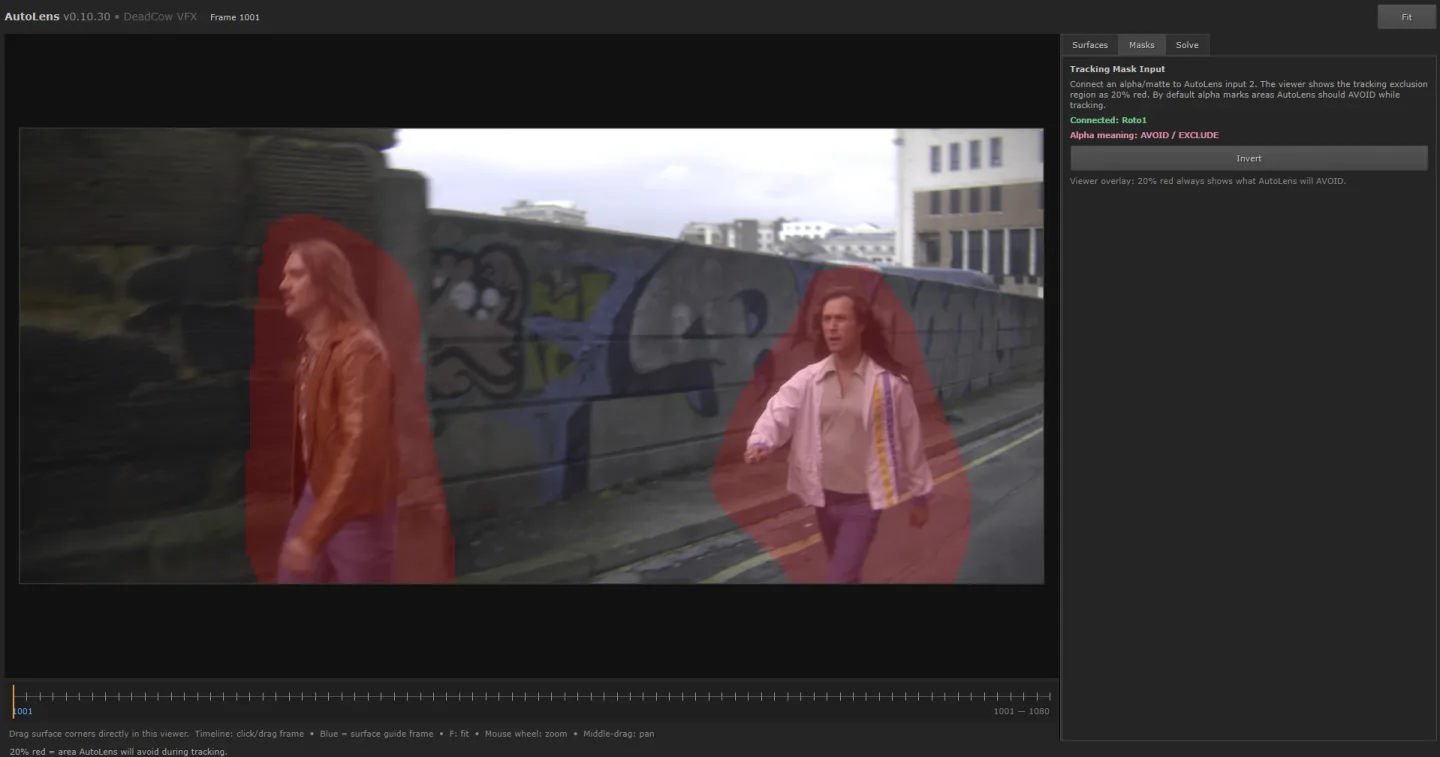
- Track: the Track button, a quality popover, inline progress and the tracking mask.
- Draw: surface tools and the surface list.
- Output: Create All, Create one, geometry status and Build geometry.
- A chip over the viewer reads NOT SOLVED, TRACKING n%, then SOLVED · 0.29 px · 9m 06s.
- The transport has Track and Stop in the centre, and the timeline has Guides, Mask and Cache lanes.
- The workspace moves to Draw (or Output) when a track finishes.
- Shortcuts: T track, P add plane, G guide frame, Del delete, Ctrl+E Create All, 1–3 steps, Space play/pause, ←/→ or ,/. step (Shift = 10 frames), Home/End.
- Plate, output, version, run mode, GPU and dense settings are in File › Solve settings…; the log is in View › Log. Every earlier control is still reachable.
- Plates are read straight from disk, like Mocha: open, press Play, and it plays. Nothing is
rendered or re-encoded and no image files are written.
- JPEG/PNG/TIFF frames are decoded by Qt on background threads. EXR and DPX frames are decoded by a pool of frame-server processes in AutoLens's managed Python (numpy + OpenEXR), which read only R/G/B, scale to the viewer and send 8-bit sRGB back over a pipe.
- Colour follows the Read's colorspace knob (linear, sRGB, Rec.709, gamma, Cineon) through Nuke's default sRGB view; other OCIO spaces are approximated and say so. If nodes sit between the Read and AutoLens, a note says the viewer shows the Read's source.
- Decoded frames stay in a memory-bounded cache (1 GB by default;
AUTOLENS_PREVIEW_CACHE_MB), neighbouring frames are prefetched, and a timeline lane shows what's in memory. - Scrubbing shows the nearest cached frame at once; Nuke's frame, the surfaces and the mask follow when the drag settles. Playback runs in real time with Loop and an fps box.
- Zoom and pan are kept while stepping or playing; zooming in loads full resolution.
- The tracking-mask overlay follows animated masks and plays with the shot. The mask is sampled at each frame (it used to show whatever frame Nuke's viewer had last evaluated). Overlays fill in idle time outward from the playhead, a frame that isn't ready shows the nearest ready one, and the cache clears only when the mask's graph or keys change.
- Track time. The SOLVED chip and status bar show how long the track took, including the
Nuke-side prep. Output › Timing breaks it down by stage; it's saved in
autolens_ui_timing.json. - Simpler controls. One Track action with Quality presets that describe themselves, readable progress (Step n of 11, elapsed, time left), plain-language errors with a What to do line, no error box on cancel, and Solve as New Version when a version already holds a solve. Tooltips on every control.
Tracking and speed
- Camera first, geometry later. Switch off Build geometry during the track to get the camera
and lens in about 2 minutes instead of about 9 on an 87-frame shot (
--skip-dense). Build geometry on Output runs only the geometry stages from the cached solve (--geometry-only) and reports progress, success, failure or interruption throughautolens_geometry_status.json. - Faster matching. Shots over 60 frames are matched sequentially (each frame against its next 20 plus frames 32, 64, 128… ahead): about 6x fewer pairs at 250 frames. If that registers under 90% of the frames, the exhaustive matches are added and the shot is solved again.
- The mapper runs global bundle adjustment half as often during the solve (the final one is unchanged), dense reconstruction only undistorts the views it uses, and the engine's Python hot loops (model parsing, view selection, mesh reading, plane growing) are faster.
- Hard shots: sparse-solve recovery ladder. When the mapper fails or registers under 80% of
the frames, the engine retries in stages before the global fallback: relaxed initial-pair
limits, low-parallax limits (nodal and push-in shots), merging partial models, denser covariant
SIFT with guided matching, and the same on contrast-normalised (CLAHE) tracking copies of the
plate. A retry is kept only if it registers more frames, with mean error under 2 px. Flags:
--sparse-recovery off|auto|maxand--min-registered-fraction. - Registration coverage and timing. The log and
autolens_result.jsonrecord unregistered frames and ranges (registration_coverage), each recovery rung (sparse_recovery) and a per-stage timing table (timings). - COLMAP options are passed only if the installed COLMAP lists them.
AUTOLENS_SPEED_PROFILE=legacyrestores the previous pipeline for A/B comparisons.
Node, startup and Nuke integration
- Smaller node panel. New nodes show Open AutoLens..., the status and Create All; everything else is on the AutoLens Advanced tab. Existing nodes keep their knobs and get the new labels.
- Create All replaces Import Result and works the same way.
- Faster Nuke launch and script open.
menu.pyno longer imports the controller module at launch, and opening a script skips nodes this version already upgraded and no longer scans every node's output folder (AUTOLENS_FULL_REFRESH_ON_LOAD=1restores the old behaviour). - The workspace window opens immediately, and the plate, surfaces, masks and timeline load
right after (
AUTOLENS_DEFER_PREVIEW=0to load them first). - Startup profiling: launch Nuke with
AUTOLENS_PROFILE=1, then runimport autolens.startup; autolens.startup.report()in the Script Editor.
Fixes
- Nuke 14: the workspace couldn't open (
QtGui.QShortcutonly exists in PySide6), and AutoLens failed to load on Python 3.9 (Path | Noneannotation inautolens/paths.py). - SyntaxError on every AutoLens knob change. The knobChanged callback was stored with a literal backslash-n, so version-menu sync never ran. Nodes saved with it are repaired when the script opens. Node labels, Surface Guides labels and some messages had the same problem.
- Nuke slowed down after adding an AutoLens node once that callback worked: AutoLens' own knob updates retriggered it on every UI tick. It now ignores its own updates and writes only changed knobs.
- Create from solve failed for Proxy Mesh, Mesh-fit Planes and Guided Surfaces
(
name 'json' is not defined), and the mesh-fit planes OBJ loaded as nothing. - Import Result could leave Redistort unwired (a node-name prefix match picked the input Dot).
- Installer: it could delete the plugin it was installing when unzipped into
~/.nuke; an interrupted upgrade lost the managed runtimes; non-ASCII tool output could fail a step; step timeouts never fired. - Stale frames in the square-pixel solve proxy when a different or shorter plate reused it.
- Degenerate Roto shapes are skipped instead of aborting the guide export, and the guide JSON is written atomically.
Project
- AutoLens is now licensed under Apache 2.0 (
LICENSE,NOTICE); both ship in the release zip. - Version guard and release workflow (
scripts/release.py, README Version numbers and releases). Pull requests run the tests on Python 3.9–3.11 and a Version check; avX.Y.Ztag onmainbuilds the release zip from that commit and posts the GitHub Release with these notes. The engine's own version strings now follow__version__too. - The release zip is no longer committed; download it from the GitHub Release.
- Build label for test installs: installing from a git checkout shows the branch or PR and
commit next to the version, e.g.
AutoLens 0.11.0 (PR #8 · d9bf93a). - Code audit (
docs/AUDIT.md): ranked findings and a roadmap of follow-up PRs. RELEASE_NOTES.mdis now this CHANGELOG; theGITHUB_PUBLISHING.mdchecklist is gone.